
Rendering Designs with the Bluepic API (GET URL Method)
The Bluepic API allows you to dynamically render your design templates by passing variable data directly into a URL. This is particularly useful for automating content creation at scale, for example, generating hundreds of personalized event banners, social posts, or product images with unique names and photos.
Instead of manually editing each design, you provide the template ID and the variable values through a specially constructed URL. The API will return a rendered image in your desired format and size.
URL Structure
The base format for rendering looks like this:
https://bx-render-v2.bluepic.workers.dev/render/{template-id}?width=1080&height=1080&format=png&data={encoded-variable-values}
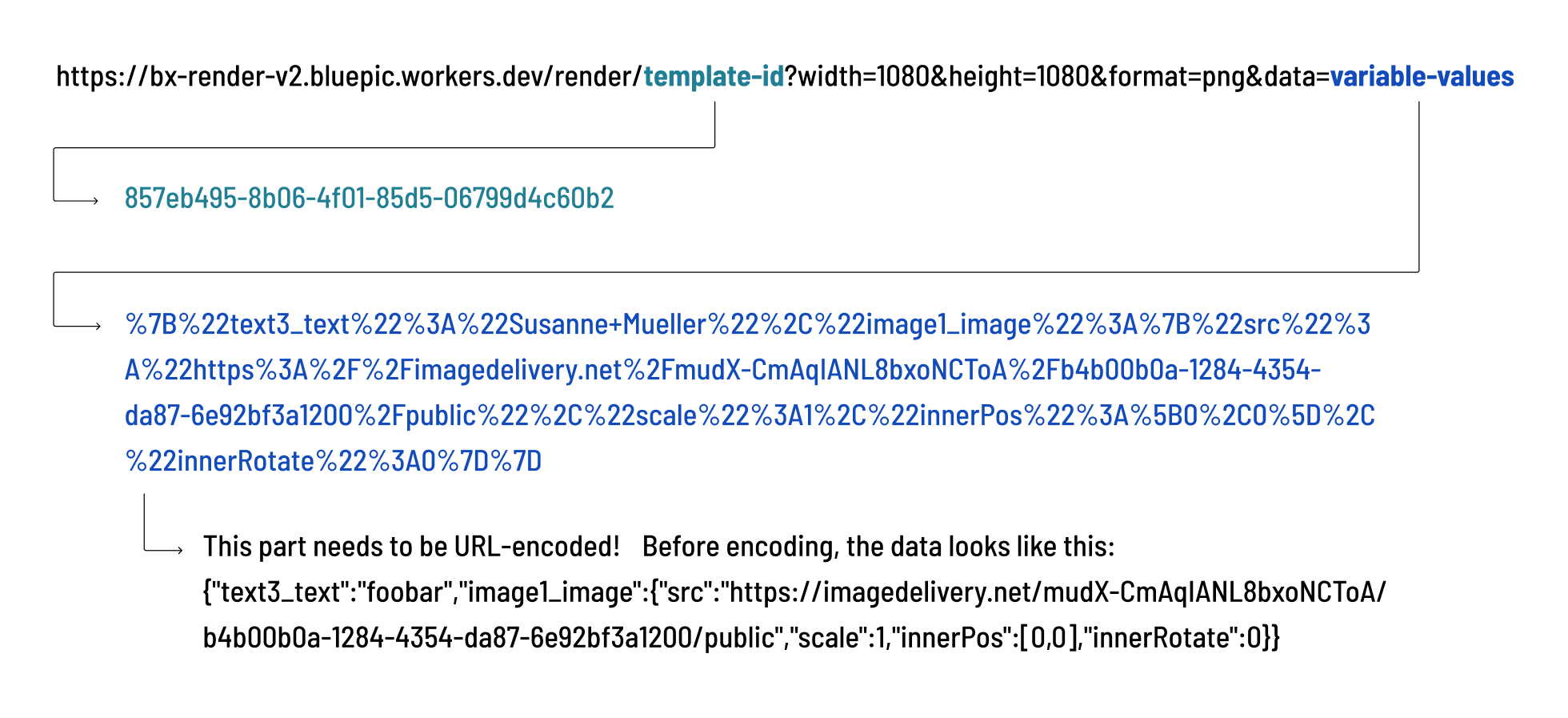
- template-id: The unique identifier of your design template. You can find this in the template URL inside Bluepic Studio.
- width and height: The output dimensions of the rendered image in pixels.
- format: The output format (e.g., png , jpg ).
- data: A JSON object with the variable values, URL-encoded.
Example
A rendered image URL may look like this:
https://bx-render-v2.bluepic.workers.dev/render/857eb495-8b06-4f01-85d5-06799d4c60b2?width=1080&height=1080&format=png&data=%7B%22text3_text%22%3A%22Susanne+Mueller%22%2C%22image1_image%22%3A%7B%22src%22%3A%22https%3A%2F%2Fimagedelivery.net%2FmudX-CmAqIANL8bxoNCToA%2Fb4b00b0a-1284-4354-da87-6e92bf3a1200%2Fpublic%22%2C%22scale%22%3A1%2C%22innerPos%22%3A%5B0%2C0%5D%2C%22innerRotate%22%3A0%7D%7D
When opened in a browser, this renders the template with the variables replaced (e.g., the person’s name and profile image).

Step 1: Write the Data Object (Unencoded)
Before URL-encoding, the data object looks like this:
{
  "text3_text": "Susanne Mueller",
  "image1_image": {
    "src": "https://imagedelivery.net/mudX-CmAqIANL8bxoNCToA/b4b00b0a-1284-4354-da87-6e92bf3a1200/public",
    "scale": 1,
    "innerPos": [0,0],
    "innerRotate": 0
  }
}
Step 2: URL-Encode the Data Object
The data parameter must be URL-encoded so it can safely be included in the API call.
Use any free web tool to convert it (Google search for "URL encoder").
For example, this:
{"text3_text":"Susanne Mueller"}
becomes:
%7B%22text3_text%22%3A%22Susanne+Mueller%22%7D
URL encoding converts special characters (like { , : , spaces, etc.) into a safe format using % codes so they can be transmitted correctly inside a URL. Without encoding, browsers and servers might misinterpret the data.
Finding the Correct Variable Names
Every editable field in Bluepic Studio has an associated variable name.
You can find these in the Input Fields view:
- Open the settings of an input field.
- Check the Variable name in the field editor.
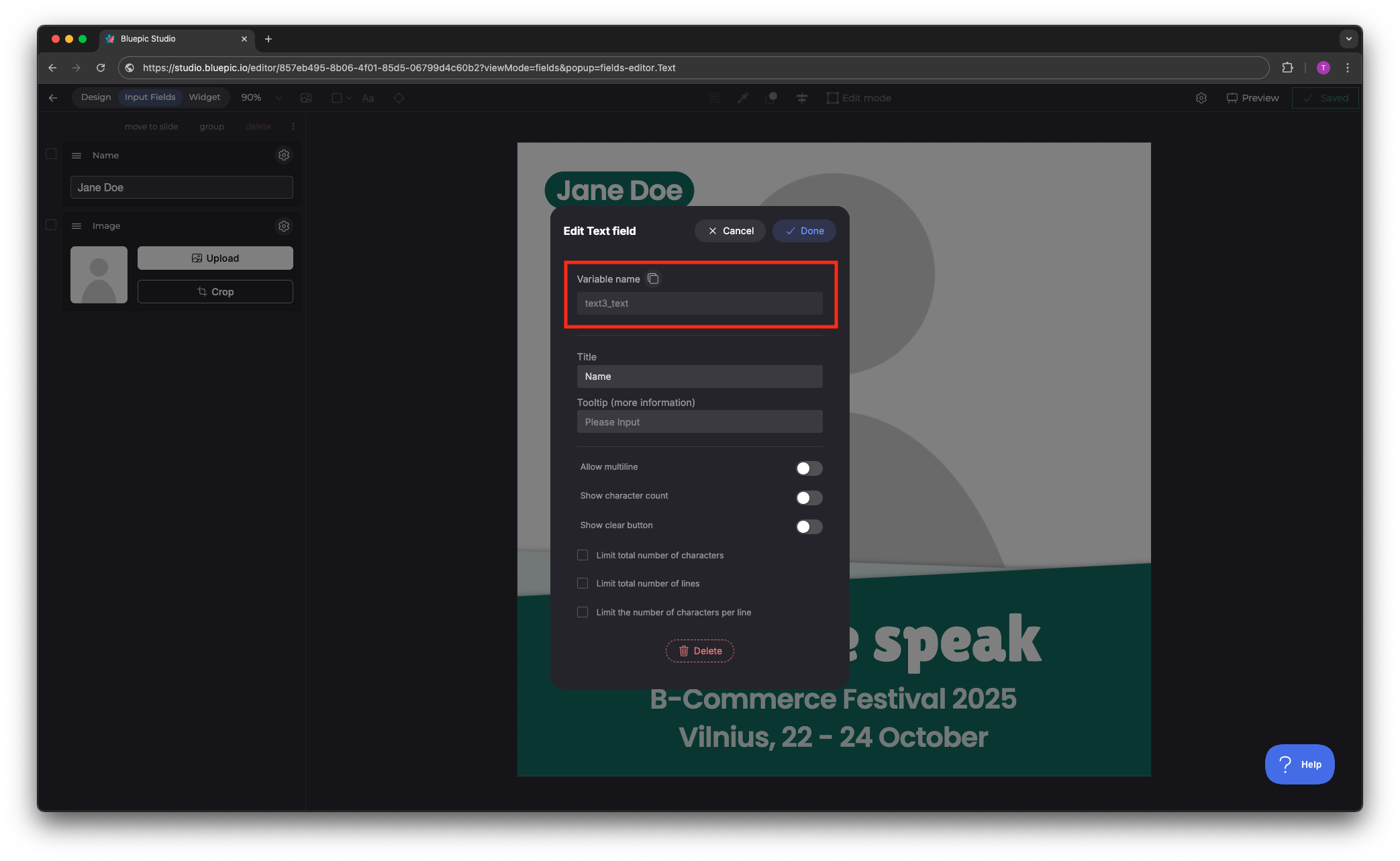
Image Fields Schema
Image fields require an object with multiple properties. The correct schema looks like this:
"image1_image": {
  "src": "https://imagedelivery.net/mudX-CmAqIANL8bxoNCToA/68ae04cd-b82a-4da1-2a42-4676b12cf200/public",
  "scale": 1,
  "innerPos": [0,0],
  "innerRotate": 0
}
src: The full image URL (image must be hosted on the internet).scale: Numeric scaling factor (default =1).innerPos: X/Y position offset inside the container (relative positioning with values from -1 to 1).innerRotate: Rotation in degrees.
Tips & Best Practices
- ✅ Always write your
dataobject in plain JSON first, then encode it. - ✅ Use a reliable online tool for URL encoding.
- ✅ If a field doesn’t render as expected, double-check its variable name in Studio.
- ✅ For image fields, always use the full object schema (not just the URL).